



Incogniton Proxy Integration
Configure Databay HTTP or SOCKS5 proxies in Incogniton: Proxy Management setup, bulk import, per-profile assignment, country targeting, sticky sessions, verification, troubleshooting, and local API automation.
 IncognitonMulti-profile browser
gw.databay.co:8888Operating principle
Keep cookies, storage, country selection and the proxy session attached to the same authorized profile.
What Is Incogniton
Incogniton is a desktop multi-profile browser for Windows and macOS that isolates cookies, storage, and fingerprint surfaces between browser profiles. Its current install documentation covers Windows x86 and x64 plus a universal macOS package for Intel and Apple Silicon. Each profile behaves like a separate workspace for authorized client administration, QA, and account security. The free starter package includes 10 profiles for its first two months and then returns to 3 profiles; API access, Selenium or Puppeteer automation, the Synchronizer, and team management require a paid tier. Do not use fingerprint controls to impersonate people, create fake accounts, or bypass platform enforcement - profile isolation is an operations tool, not an identity fabricator.
Why Pair Incogniton With Databay
The pairing works because Databay exposes one managed gateway - gw.databay.co:8888 - where product, country, and session requests live in the proxy username, while Incogniton's Proxy Management area stores and groups reusable proxy configurations. Save one Databay entry per workspace so the intended routing configuration remains associated with that profile without retyping credentials. The actual exit can rotate or a sticky request can end early, so verify it instead of treating an IP as a permanent profile identity.
Prerequisites
You need a Databay account with the gateway host, port, and username:password pair from the dashboard, and Incogniton installed (free plan is enough for manual setup; automation needs a paid tier). Plan the proxy username per workspace before touching the UI: USER-zone-residential-countryCode-us-sessionId-client01 style flags decide pool, geography, and stickiness per profile. Keep credentials in a password manager - never embed production secrets in screenshots or shared templates.
Add Databay in Proxy Management
Incogniton's current documented flow starts in the browser-profile overview: open Proxy Management, then choose Create Single Proxy in the left-side menu.
- Select the connection type that matches the Databay route you intend to use. Databay supports HTTP proxying, HTTPS CONNECT tunnelling, and SOCKS5; require Incogniton's connection check to pass before saving.
- Set Proxy:PORT to
gw.databay.co:8888, then enter the Databay Proxy username and Proxy Password from the dashboard. Do not put real credentials in screenshots, exports, or shared templates. - Give the proxy a name tied to its authorized workspace and optionally assign a group. The name should identify the intended countryCode or sessionId policy without exposing the password.
- Leave Rotating proxy off for a normal Databay gateway entry: Databay pool selection and requested stickiness are encoded in the username, not an Incogniton rotation URL. Without a
sessionId, new connections use rotating pool selection, but a different IP on every connection is not guaranteed. - Click Check proxy, then use the center-arrow control to save the verified entry to the proxy database.
Assign the Proxy to a Profile
From Profile Management, create a profile or edit an existing one.
The screenshots below come from Databay's May 2024 guide and show Incogniton 4.0.0.0. Labels and layout can differ in newer releases. Select an image to view it full size.
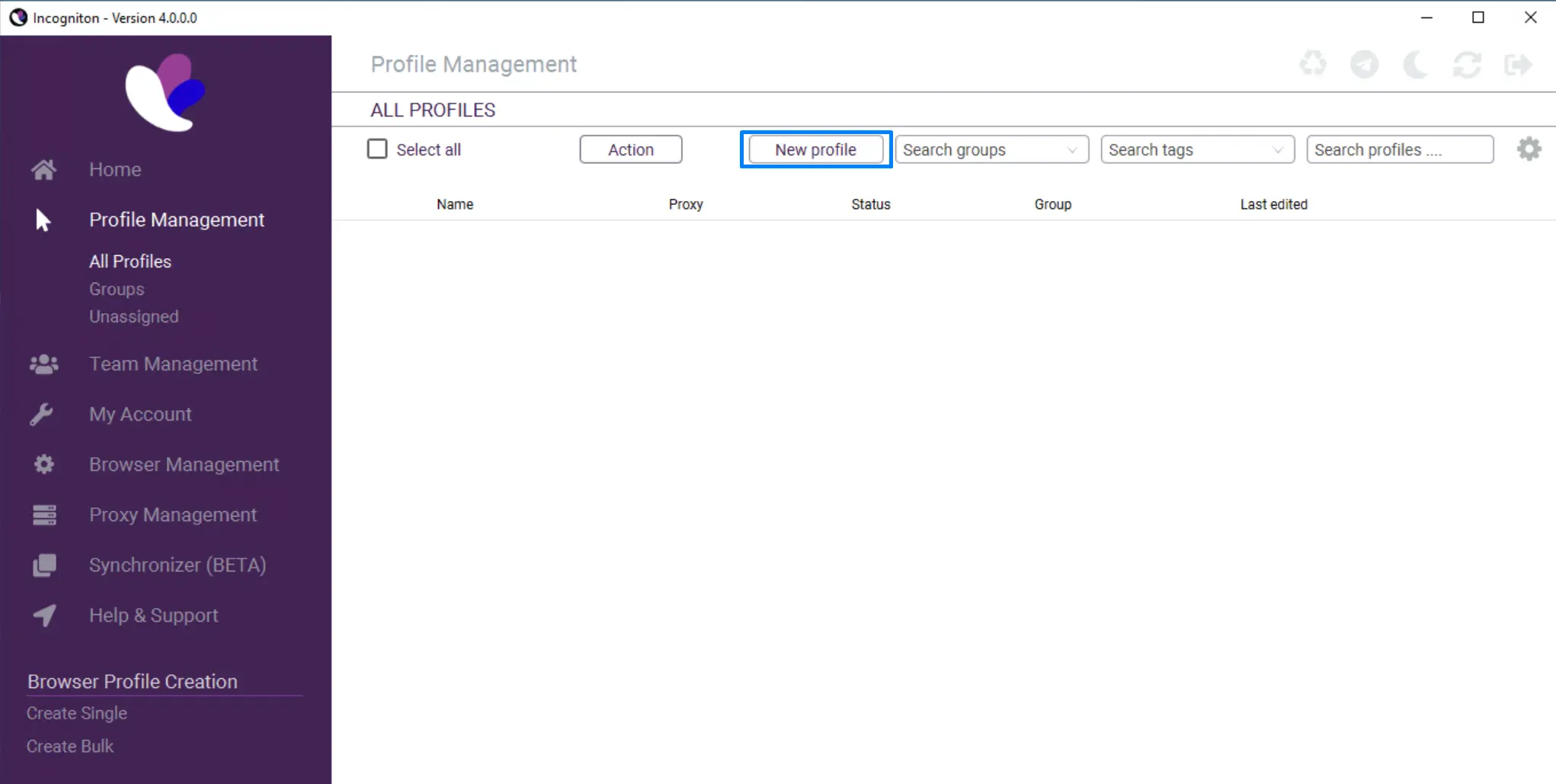
Open the profile's Proxy settings and choose Proxy Management. Select the saved Databay entry, then create or update the profile. Reusable entries should come from Proxy Management so the reviewed name, group, connection type, and credentials stay together; use a one-off custom configuration only when the current profile form explicitly offers it.
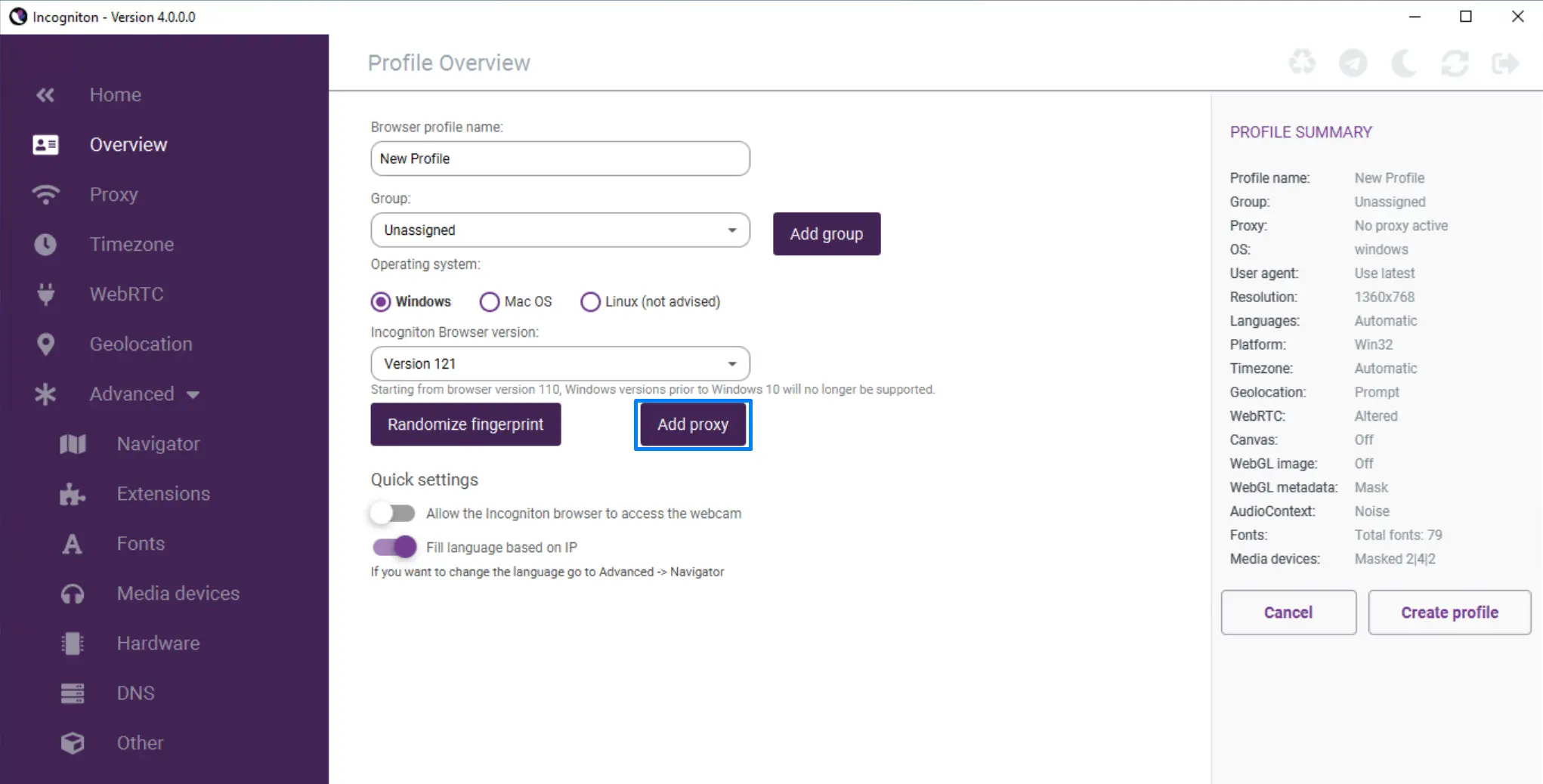
Incogniton can derive timezone, WebRTC, and geolocation values from the observed proxy IP. Treat those as observed defaults and verify them after connection; a requested Databay country is not a guarantee that every derived value will match. Start the profile and verify the actual exit before using the workspace. Do not use Incogniton's built-in shared proxies for account administration: Incogniton explicitly says they are not suitable for account management because the IPs are shared among users.
Country Targeting and Sticky Sessions
Geography and persistence are Databay username flags, so the same saved-entry mechanics cover every case. Add -countryCode-us when an authorized test needs a US network origin. Add -sessionId-client01 when the workflow needs temporary continuity: Premium Residential, Datacenter, and Mobile accept requested sticky windows up to 120 minutes, while Residential Flex accepts up to 30 minutes. Upstream availability can change the exit before that requested maximum, and the route is not a dedicated device or permanent address. Use a separate session label for each profile that needs a separate logical session, but do not assume labels guarantee different underlying IPs. Choose residential or datacenter by required network origin, controls, measured workload result, and cost; compare the documented facts on the residential and datacenter pages.
Verify the Network Path
Verify at three layers before trusting a profile. First, Check proxy in Create Single Proxy or the profile editor must pass. Second, treat the lightning-bolt indicator in Profile Management as a latency signal: Incogniton currently labels purple as perfect, green as great, orange as medium, and red as bad. A speed color is not proof that the expected country or Databay policy was applied. Third, start the profile, open the Databay IP checker, and confirm the observed exit IP and country match the username's countryCode flag.
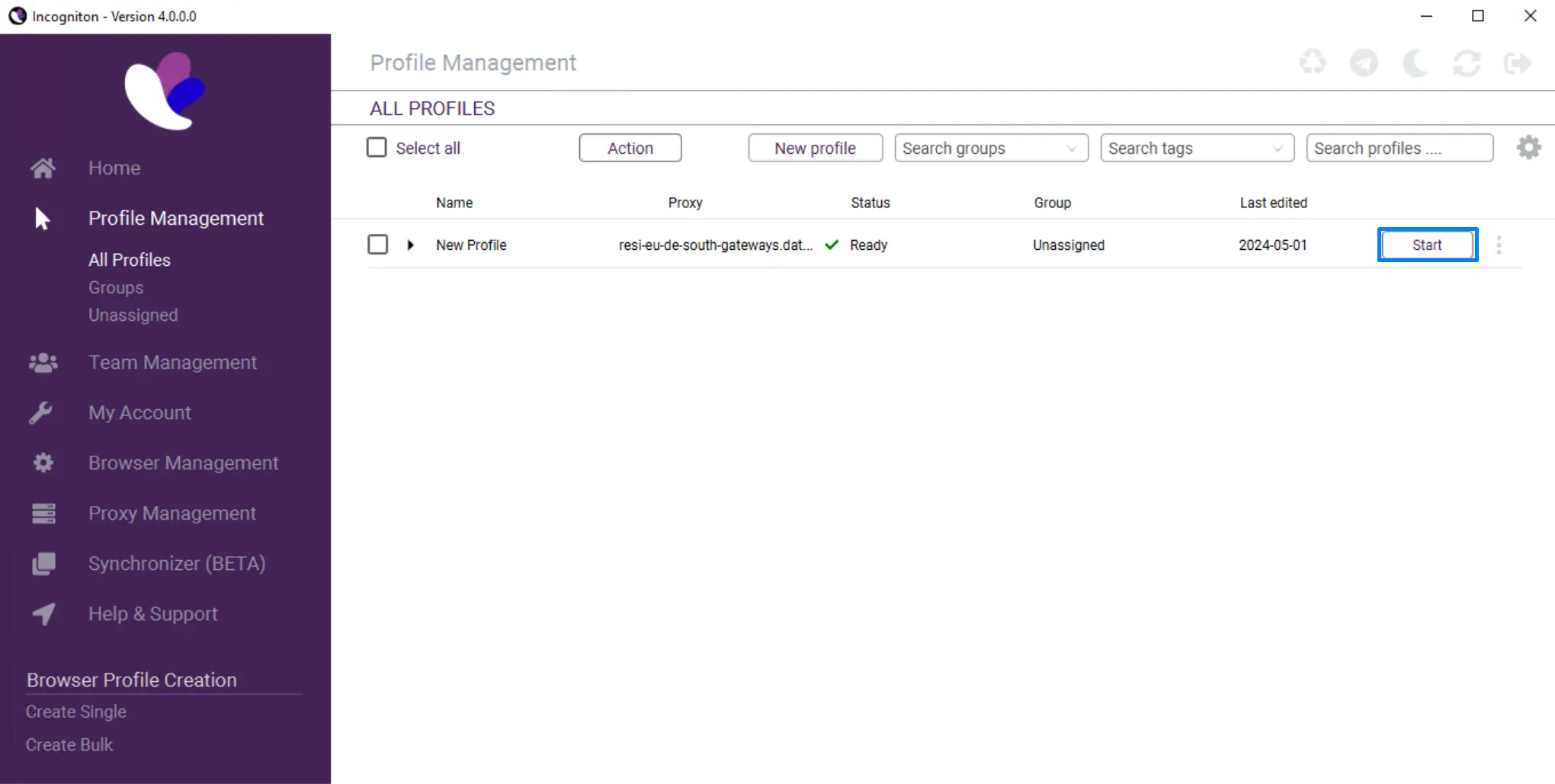
gw.databay.co:8888 from the setup instructions above.If your direct address appears instead, stop before signing in to anything and fix the assignment. For debugging outside Incogniton, its docs recommend testing the same credentials in Firefox with FoxyProxy - if the proxy works there but not in Incogniton, the mismatch is in the profile configuration rather than the gateway credentials.
Troubleshooting Connection Failures
Incogniton's troubleshooting doc frames failures as "a mismatch between what your proxy expects and what's configured in Incogniton", and the same four mismatches cover Databay setups:
- Protocol mismatch - a SOCKS5 entry created under the HTTPS connection type (or vice versa) fails the check. Recreate the entry with the type that matches the credentials you tested.
- Missing port - the ip:port field needs
gw.databay.co:8888, not the bare host. - Wrong auth mode - Databay gateway entries use username:password; if the account is configured for IP-allowlist auth instead, the credential fields must be empty and the machine's IP must be on the allowlist.
- Environment leaks - if the exit is right but the page behaves oddly, Incogniton suggests manually setting timezone, WebRTC, and geolocation by disabling the three Fill-based-on-IP toggles; with a correctly matched Databay country flag the defaults are usually the safer choice.
Automate With the Local API
On paid tiers, the Incogniton desktop app exposes its local API at http://127.0.0.1:35000. The app must be open, the automation API enabled, and the profile available; the current official SDK documentation says local calls require no separate API token or cloud authentication. Keep the listener local and do not expose port 35000 to another machine or public network. Profile operations include POST /profile/add, GET /profile/all, GET /profile/launch/{profile_id}, GET /profile/status/{profile_id}, and GET /profile/stop/{profile_id}. For browser automation, the API can launch profile-bound Puppeteer or Selenium sessions and return a local connection URL; use the current SDK or API reference for request bodies rather than copying credentials into source code. The runtime patterns are the same as our Puppeteer and Selenium runbooks, except Incogniton owns the browser and persists the proxy configuration with the profile. This section is documentation-reviewed, not a claim that Databay executed the paid Incogniton automation flow.
Choose Residential or Datacenter by Requirement
Residential and datacenter pools provide different network origins, documented controls, observed availability, latency, and price. Choose from the authorized test requirement and measure the exact workload; neither origin is a universal performance or acceptance upgrade. Do not switch pools or session IDs to route around a 403, 429, CAPTCHA, or other source control; stop, back off, or use an approved API or access method instead.
Operational Safety
Maintain written account authorization, role-based access, multifactor authentication, profile ownership, access logs, and offboarding. Incogniton's paid team features map cleanly onto that discipline - use roles and permissions to keep who can change a profile or proxy explicit. Give profiles separate storage for security, not as invented identities. Apply source terms and one domain-level request budget across all profiles. Databay's Acceptable Use Policy prohibits spam, deceptive engagement, and unauthorized access.
Questions specific to Incogniton
Should I choose HTTP or SOCKS5 in Incogniton?
Can several profiles share one Proxy Management entry?
How do I keep the same IP during a profile session?
How many proxies can I add at once?
Why does Incogniton's proxy check fail when the credentials work elsewhere?
Should I use Incogniton's free built-in proxies instead?
Same gateway, different control surface
Multilogin
Multi-profile browser
Profile settings -> Proxy -> Custom -> HTTP or SOCKS5 -> automatic check
Octo Browser
Multi-profile browser
Proxy column -> temporary or saved route -> Check Proxy -> observed exit
GoLogin
Multi-profile browser
Location column -> external proxy -> connection check -> assigned profile
Dolphin Anty
Multi-profile browser
Proxy screen -> connection check -> saved route -> assigned profile
Python Requests
HTTP client library
Session -> HTTPAdapter policy -> proxy hop -> approved destination









Choose the exit pool after the control path works. Choose residential for an ISP-origin route or datacenter for a hosting-network route, then measure the authorized workload.
Where teams run Incogniton behind the gateway: Proxies for social media operations · Proxies for e-commerce accounts
Ship Incogniton to production
Create an account, drop in your gateway credentials, and route your first Incogniton request in minutes.
Pricing, order minimums, and traffic validity vary by product.