




Live request trace
What Is My IP Address?
See the public IP address and approximate location your connection reveals to every website you visit, detected in real time with no signup.
Your public IP address
216.73.216.48IPv4
- Continent
- North America
- Country
- United States
- Region
- Ohio
- City
- Columbus
- Coordinates
- 39.96118, -82.99879
- Timezone
- America/New_York
- Liveread from your connection
- No signupand no API key
- JSONmachine endpoint
Observed server-side from your connection's edge headers, not from browser fingerprinting.
What Your IP Address Reveals
Every website you visit can see your IP address and use it to infer information about you.
Geographic Location
Your IP reveals your approximate location to city level: your country, region, and often your city. It cannot pinpoint your exact street address, but it narrows you down considerably.
Internet Service Provider
Your ISP is identifiable from your IP's registered WHOIS data. This reveals whether you use a residential connection, a mobile carrier, or a datacenter or VPS network.
Online Privacy and Tracking
Websites and analytics services can record an IP and combine it with cookies, account data, and browser signals. A proxy changes the network address normally seen by the destination, but it does not erase identity, cookies, fingerprinting, account history, or cross-site tracking.
Connection Type
Address ranges may be classified as residential, mobile, datacenter, or hosting. Destinations can use that estimate alongside address history, protocol, browser, account, rate, and behavior; no class has a universal trust score.
How a Proxy Hides Your IP Address
A proxy server acts as an intermediary between you and the websites you visit. When you route traffic through a proxy, the destination site sees the proxy's IP address instead of yours.
Your device connects to the proxy. The request is sent to the proxy server instead of the target website.
The proxy forwards the request. It reaches the target website from the proxy's own IP.
The response travels back. The website responds to the proxy, which passes the data back to you.
The destination normally observes the proxy exit address. A correctly configured proxy normally causes the destination to receive the proxy's public IP at the network layer. Forwarded headers, DNS requests, browser features, or traffic outside the proxy path can still expose client information.
- A correctly configured proxy normally causes the destination to observe the proxy exit IP
- Forwarded headers, DNS requests, browser features, or traffic outside the proxy can expose client information
- Accounts, cookies, fingerprints, behavior, and logs can still correlate activity
- Rotation changes one network identifier; it does not guarantee a fresh or different IP or prevent profiling
- Request one supported country target and verify the observed exit
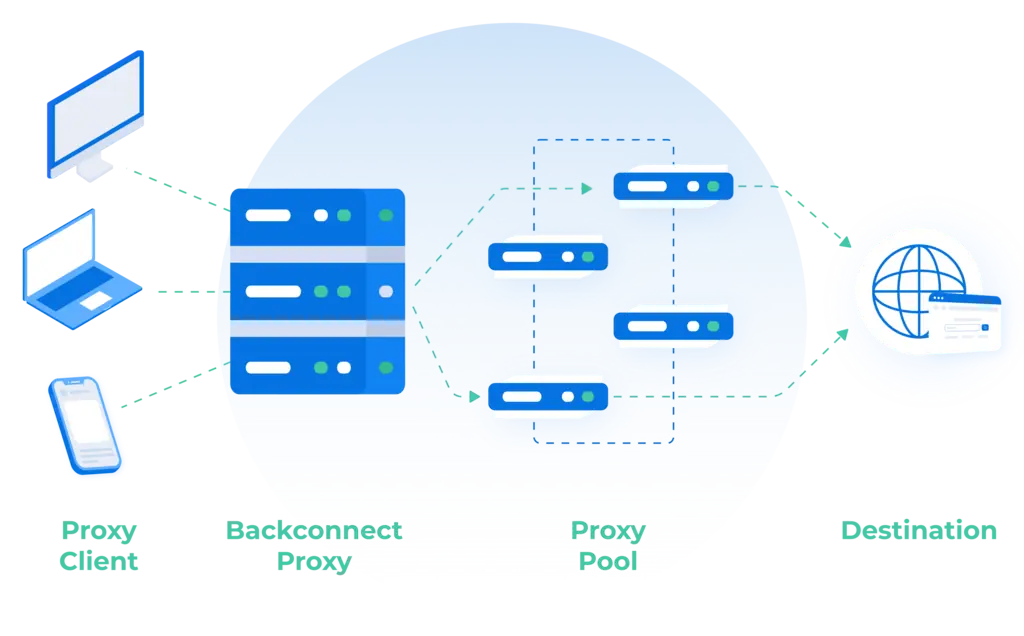
Databay's shared rotating pools may select an available exit for a new proxy connection, while a reused connection can retain one. Rotation changes one network identifier; it does not guarantee a fresh or different IP, and account, cookie, fingerprint, behavior, and log correlation can still support profiling.
IPv4, IPv6, Public and Private
Not all IP addresses work the same way. These are the distinctions that matter most when you read the result above.
IPv4
192.0.2.1The original 32-bit format, written as four numbers from 0 to 255. Its pool of about 4.3 billion addresses is nearly exhausted, so networks increasingly share and reuse them.
IPv6
2001:db8::1A newer 128-bit format with a vastly larger address space. Adoption keeps growing, though most connections still default to IPv4 today.
Public and private
192.168.x.xA public IP is assigned by your ISP and is visible to every site you reach. A private IP works only inside your local network and never appears on the open internet.
Dynamic and static
reassigned on reconnectMost home connections use dynamic IPs that your ISP reassigns periodically or on reconnect. A static IP stays fixed but usually costs extra.
Check Your IP from the Command Line
The same lookup is available as a machine-readable JSON endpoint: free, no API key, no signup. Point curl, a script, or a monitoring job at it to log the egress IP and the geo data resolved for the request.
- No API key and no signup
- Returns IP, country, city, region, coordinates and timezone
- Scriptable for monitoring, logging and CI jobs
$ curl https://databay.com/what-is-my-ip/json
{
  "UserIpAddress": "203.0.113.42",
  "UserAgent":     "curl/8.7.1",
  "IPCity":        "San Francisco",
  "IPCountry":     "US",
  "IPContinent":   "NA",
  "IPLongitude":   "-122.41940",
  "IPLatitude":    "37.77490",
  "Region":        "California",
  "RegionCode":    "CA",
  "MetroCode":     "807",
  "PostalCode":    "94103",
  "TimeZone":      "America/Los_Angeles"
}Why Use a Proxy Service?
Beyond hiding your IP, proxies do three production jobs: privacy, geo-specific viewing, and scaled data collection.
Change the Network Address Sites See
For traffic routed correctly through a proxy, a destination normally observes the proxy exit IP. Verify proxy and DNS configuration; forwarded headers, browser leaks, accounts, cookies, fingerprints, behavior, and logs can still expose or correlate activity.
Residential proxiesSee Geo-Specific Content
Add a supported network-origin sample while recording account, language, device, delivery, tax, and personalization limits. The separate catalogue contains 195 published paid-location route pages.
Browse proxy locationsScale Web Scraping
Spread large data collection jobs across millions of rotating IPs so no single address carries the whole workload. Built for public-data crawls.
Web scraping proxiesHide Your IP Address with Databay
Compare rotating residential, datacenter, and mobile products with pay-as-you-go pricing. The 34M+ residential-IP figure is a cumulative historical catalogue total, not current live availability. Browse 195 published paid-location route pages separately. No contracts.
Residential Proxies
The 34M+ ISP-origin-IP figure is a cumulative historical catalogue total, not current live availability. Product-specific geo controls apply. A proxy changes the network address a site sees; it does not guarantee anonymity.
Explore residentialDatacenter Proxies
The 80K+ server-hosted-IP figure is a cumulative historical catalogue total, not current live availability. Country and continent controls apply. Benchmark the authorized route, destination, and load.
Explore datacenterMobile Proxies
The 800K+ carrier-network-IP figure is a cumulative historical catalogue total, not current live availability. The shared rotating product publishes 155+ countries for work that specifically requires carrier-network origin.
Explore mobileCommon IP Address Questions
What is an IP address?
What is my IP address?
What is the difference between a public and private IP?
Does my IP address reveal my exact location?
What is the difference between IPv4 and IPv6?
How can I change the public IP a website sees?
Why does my IP address change?
Is there a free IP lookup API?
Can websites track me by IP address?
Change the IP an endpoint sees
Request ISP-origin routes with product-specific geo controls. The 34M+ IP figure and 195 paid-location route pages are cumulative catalogue references, not current live-exit guarantees.
Compare network origin, targeting controls, and product minimums before ordering.