



The 30-Second Decision#
A proxy is usually the smaller routing tool: one configured application sends supported connections through a relay. A VPN is usually the broader routing tool: the operating system sends selected network traffic through a tunnel to a gateway. That distinction matters more than the labels “privacy” or “security.”
Start with the narrowest tool that satisfies a documented, authorized requirement. If one test runner needs a particular egress route, a proxy is often easier to isolate and audit. If a managed laptop must reach a private company network or protect multiple applications on an untrusted local network, a VPN is usually the better control point.
| Requirement | Likely starting point | Reason to verify |
|---|---|---|
| One browser, script, or API client needs a controlled egress route | Proxy | Other apps can remain direct, but DNS and protocol support depend on the client. |
| Most traffic on a managed device must enter a private network | VPN | Split tunneling, local routes, IPv6, and DNS policy can still create exclusions. |
| Regional QA for a site you own | Proxy or VPN | Choose the one that preserves a clean test baseline and record the observed exit. |
| Protecting several apps on untrusted Wi-Fi | VPN plus HTTPS | The VPN protects the hop to its gateway; HTTPS still protects content to the destination. |
| High-risk anonymity or personal safety | Neither by category alone | Account identity, browser state, payments, logging, endpoints, and operator trust require a specific threat model. |
Where Traffic Actually Changes Path#
The original route map below shows the practical difference. With an application proxy, only a configured client is guaranteed to ask the proxy to relay a supported connection. With a VPN, an operating-system routing policy decides what enters the encrypted tunnel. Neither path proves that every packet follows the advertised route.
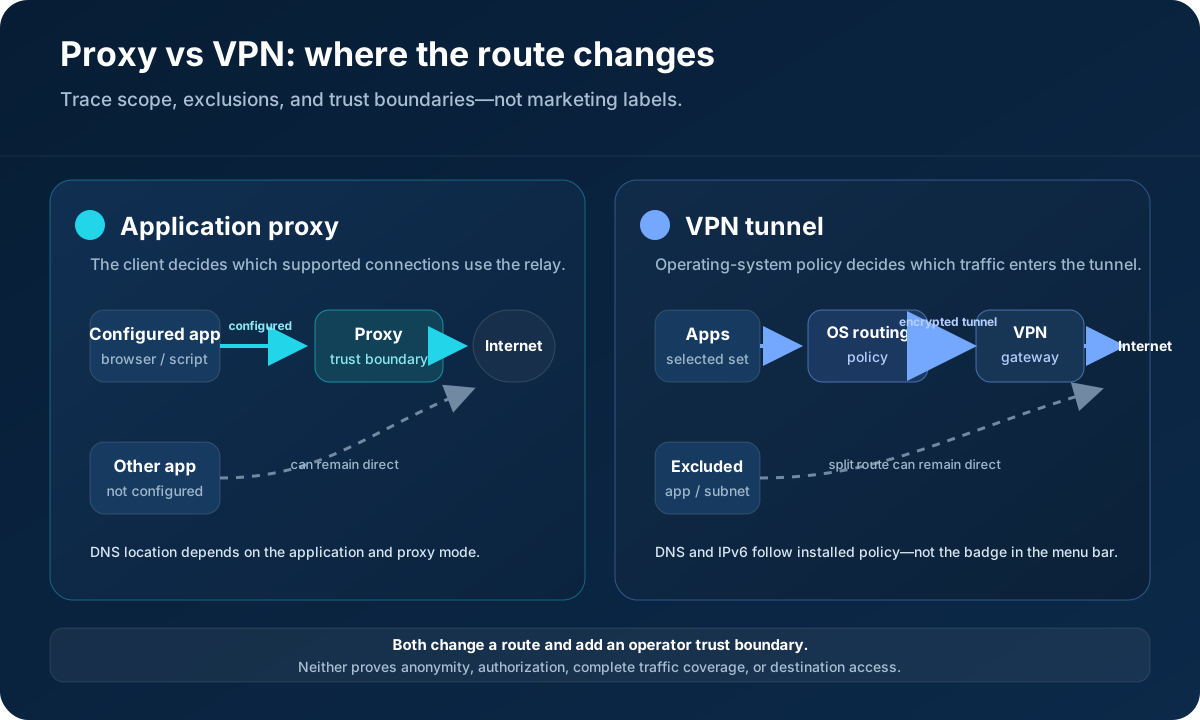
HTTP’s CONNECT method asks a proxy to establish a tunnel to a destination and then forward data in both directions. SOCKS5 defines a general relay interface with IPv4, domain-name, and IPv6 address forms. By contrast, the IPsec architecture describes protection at the IP layer between hosts or security gateways. Real products can combine these mechanisms, so configuration, not the product category, determines the route.
A useful mental model is to mark three boundaries: where traffic enters the new route, where that route ends, and what remains outside it. If those three facts are not written down, “the proxy is on” or “the VPN is connected” is not a sufficient test result.
Encryption: Separate the Local Hop from the Destination#
A VPN normally encrypts traffic between the device and VPN gateway. It does not replace end-to-end HTTPS: after traffic leaves that gateway, TLS is still what protects application content to an HTTPS destination. A basic HTTP proxy does not automatically encrypt the client-to-proxy hop. When HTTPS is carried through CONNECT and certificate validation succeeds, the TLS session is normally between the application and destination while the proxy relays encrypted bytes.
| Question | Application proxy | VPN |
|---|---|---|
| What receives the original connection? | The configured proxy client connects to the proxy gateway. | The device connects to a VPN gateway through a tunnel protocol. |
| Is the local-network hop protected? | Only if the proxy transport or application protocol protects it; HTTPS content can remain encrypted through CONNECT. | Selected traffic is normally encrypted from device to VPN gateway. |
| Who can observe connection metadata? | The proxy operator can observe gateway connections and routing metadata. | The VPN operator can observe tunnel and post-gateway routing metadata. |
| Who protects content to an HTTPS site? | TLS certificate validation and endpoint security; neither service should be treated as a replacement. | |
| Does the tool guarantee anonymity? | No. Accounts, cookies, browser state, payments, logs, endpoints, and behavior can identify or correlate a user. | |
For plain SOCKS5, the protocol supplies relaying and optional authentication; it does not add content encryption. For an HTTP proxy over an unprotected local connection, avoid sending plain HTTP or secrets. In both categories, the operator becomes a meaningful trust dependency. Review ownership, security controls, logging and retention language, jurisdiction, abuse handling, and incident history.
DNS, IPv6, WebRTC, and Split-Tunnel Failure Modes#
Most route surprises happen outside the happy-path IPv4 web request. A browser may resolve a hostname locally before handing an address to a proxy, or it may pass the hostname for remote resolution. A VPN client may install a DNS resolver for tunneled traffic while leaving split-tunneled domains or local-network queries elsewhere. IPv6 can take a different route from IPv4. Browser real-time communication can also expose additional network candidates, although modern browser behavior and enterprise policy vary.
Do not reduce this to a generic “leak test.” Define the expected result for each channel first:
- DNS: Which resolver should receive queries for public names and private company names?
- IPv4 and IPv6: Should both use the new egress, should IPv6 be intentionally direct, or is it unavailable?
- UDP: Does the selected proxy protocol and client support it, or should the application avoid it?
- Local subnets: Should printers, development services, and private ranges remain reachable?
- Browser communication: Are WebRTC features required, disabled by policy, or expected to use a managed route?
- Failure behavior: If the gateway disappears, should traffic stop, retry, or fall back to a direct route?
A direct fallback can be convenient for low-risk testing and unacceptable for a managed security boundary. Treat that as an explicit design choice, not an implementation detail.
A Reproducible Ten-Minute Route Verification Lab#
This lab does not benchmark providers and does not prove anonymity. It answers a narrower, repeatable question: which route did this specific client use at this time? Run it only with an account and endpoints you are authorized to test. Keep the password out of command history by reading it interactively.
# 1. Record the direct route.
curl --fail --silent --show-error https://databay.com/what-is-my-ip/json

# 2. Set non-secret proxy values from your own dashboard.
DATABAY_PROXY_SERVER='http://gw.databay.co:8888'
DATABAY_PROXY_USER='YOUR_DOCUMENTED_USERNAME'
read -s DATABAY_PROXY_PASS

# 3. Record the proxied route without placing the password in the URL.
curl --fail --silent --show-error \
  --proxy "$DATABAY_PROXY_SERVER" \
  --proxy-user "$DATABAY_PROXY_USER:$DATABAY_PROXY_PASS" \
  https://databay.com/what-is-my-ip/json

unset DATABAY_PROXY_PASS
For a VPN, capture the direct result, connect the VPN using your organization’s approved client, then run the same request again. Repeat the comparison separately for every application and protocol that matters; one browser result says nothing about a background updater, native database client, IPv6 connection, or DNS path.
| Mode | Application | Observed IP | IPv4/IPv6 | DNS path checked? | Expected exclusions | UTC time |
|---|---|---|---|---|---|---|
| Direct baseline | curl | Record result | Record family | Yes / No | None | Record |
| Proxy | curl or target client | Record result | Record family | Yes / No | Unconfigured apps | Record |
| VPN | Target app | Record result | Record family | Yes / No | Document split routes | Record |
If results differ from the design, stop and inspect routing tables, client proxy settings, name resolution, and protocol support. Do not “fix” a block or challenge by changing identity; a destination refusal is an access-control signal, not evidence that routing is broken. The browser IP diagnostic and proxy checker provide additional controlled checks.
Performance: Measure the Workload, Not the Category#
There is no responsible universal answer to “is a proxy faster than a VPN?” Both add a route and processing step. Results change with gateway distance, congestion, protocol, connection reuse, DNS, packet loss, the destination, and whether a browser opens many parallel resources. A datacenter proxy near the destination can outperform a distant VPN for one HTTP workload; a well-peered VPN can outperform a congested proxy on another.
Build a small authorized benchmark with a fixed client, fixed destination set, fixed region, and fixed concurrency. Capture at least connection success, DNS time, TCP/TLS connection time, time to first byte, total duration, bytes transferred, and retry count. Report medians and a tail percentile such as p95 rather than publishing a single best run. Change only one routing variable at a time.
| Field | Why it matters |
|---|---|
| Client, version, and protocol | Different stacks pool connections and resolve names differently. |
| Client, gateway, and destination regions | Distance and peering can dominate the result. |
| Concurrency and connection reuse | A warm pooled connection is not comparable to a new tunnel. |
| Median and p95 over repeated runs | Tail latency exposes intermittent route or capacity problems. |
| Failure and retry policy | Dropping failures makes a route appear artificially fast. |
When a Proxy Fits and When a VPN Fits#
A proxy fits best when routing is intentionally application-scoped: an approved test runner needs a stable egress allowlist, a synthetic monitor needs a documented regional sample, or a permitted data workflow needs a supported network origin. Per-client configuration can make ownership, budgets, and logs easier to separate. Residential, mobile, ISP, and datacenter proxies describe different network origins; they do not create permission to access a source.
A VPN fits best when the network policy belongs at the device or site boundary: employees need authenticated access to private company services, a managed device needs an encrypted route to an organization’s gateway, or multiple applications must share the same controlled egress. Split tunneling can preserve local or high-bandwidth routes, but every exclusion needs a reason and an owner.
Sometimes neither is the right starting point. A private link, service mesh, API gateway, SSH tunnel, destination allowlist, licensed feed, or direct API can provide a smaller and more accountable trust boundary. Choose from the requirement outward rather than purchasing a category and inventing a use for it.
Provider Trust and Production Readiness Checklist#
Once the route works, evaluate the operator and operating model. Marketing claims such as “no logs,” “anonymous,” or “military-grade” are not architectures. Ask what data exists, which systems create it, how long each record remains, who can access it, and what happens during an incident.
- Ownership: Identify the legal operator, infrastructure model, subprocessors, and jurisdictions relevant to the service.
- Authentication: Prefer scoped credentials, rotation, revocation, least privilege, and IP allowlisting where appropriate.
- Logging: Separate billing totals, authentication logs, destination metadata, support logs, and application content; they have different risk.
- Failure policy: Decide whether a route outage must fail closed or may fall back to direct access.
- Observability: Record gateway region, request ID, result class, timing, and retry without logging passwords, tokens, or sensitive payloads.
- Abuse controls: Confirm how the provider responds to complaints, compromised credentials, and destination blocks.
- Change control: Pin client versions, test upgrades, and keep a rollback path for routing-policy changes.
For high-stakes anonymity, personal safety, regulated data, or privileged credentials, obtain security advice for the real threat model. A generic comparison page cannot establish that either category is safe for those circumstances.
The Final Selection Worksheet#
Write one sentence for each item before selecting a product: the applications in scope; destinations you are authorized to reach; required TCP or UDP protocols; expected DNS behavior; IPv4 and IPv6 policy; gateway and destination regions; local-network exclusions; failure behavior; operator visibility; retention limits; identity and access controls; performance target; request budget; incident owner; and exit plan.
If the scope is one application and you can prove unsupported traffic stays outside the design, test a proxy first. If the policy must cover several applications or reach a private network, test a VPN first. If the reason is “be anonymous,” “get around a block,” or “make the destination think I am someone else,” the requirement is not ready: revisit authorization and the threat model before choosing either tool.
Keep the completed route worksheet beside the system diagram and re-run it after client, browser, operating-system, DNS, or gateway changes. That turns a vague privacy claim into a falsifiable network control.